
Why Some Permit Scan Changes Don’t Trigger a New Campnab Alert
Posted Monday, July 20, 2026

Eric Karjaluoto
I’m one of the two people working on Campnab. I like to run, ski, bike, and camp with my family and friends. (I love saunas.)
Find me:


Permit scans can sometimes behave differently from campsite scans. This can lead to situations where a member sees availability change in the booking system but does not receive a second Campnab alert.
One example is this: “I received a Campnab alert for a permit, but later one of the dates disappeared. Then that same date opened up again, but I didn’t receive another alert. Shouldn’t Campnab have notified me again?”
That’s a completely reasonable question. The answer depends on how the scan is set up, what changed in the booking system, and whether you’re scanning for a campsite, permit, backcountry zone, shuttle, pass, or some other kind of reservable thing.
I realize “reservable thing” isn’t exactly elegant. So, for the sake of this article, I’ll use the phrase reservable item. A reservable item is the thing Campnab sees as bookable when it checks a reservation system. In some cases, that item is a single campsite. In other cases, it might be a permit area with a changing number of available spaces.
This distinction helps explain why campsite alerts and permit alerts can behave differently.
Campsites usually work as separate openings
With regular campsite scans, each campsite is treated as its own reservable item in most systems we monitor. This means a new campsite opening can trigger a new cancellation alert, even if another campsite from the same scan is still available.
For example, let’s say you’re scanning for a date at Glacier National Park. Site R050 becomes available and it matches your scan criteria, so Campnab sends you an alert. A little later, site R031 also opens up for that same day. Even if R050 is still available, R031 is a new and separate campsite opening. Since it’s a different reservable item, Campnab can send another alert for that new opening.
This is generally how people expect campsite alerts to work. If a new campsite opens up and it matches your scan, you’ll usually want to know about it, even if another campsite from the same scan is still available.
Some permits work more like shared inventory
Permits can behave differently because, in some cases, the booking system presents them less like a set of separate campsites and more like a shared pool of inventory.
Take Brooks Camp Camping Permits at Katmai National Park as an example. From Campnab’s perspective, this permit can behave more like a single reservable item. There may be a changing number of spaces available for that permit, but those spaces are not always treated the same way as separate campsites.
So, if one Brooks Camp permit opens for next Tuesday, Campnab can send an alert. But if a second space later opens for that same permit and date, that may simply look like a change in quantity rather than a completely new reservable item becoming available.
In that situation, you might not receive a second alert, because Campnab is not seeing a new campsite-style opening. It is seeing the same permit inventory with a different number of available spaces.
This can feel counterintuitive, especially if you’re looking at the booking calendar and thinking, “There were zero spots, then one spot, then two spots.” From your perspective, something changed. From the scan’s perspective, though, the permit was already available.
Not all permits behave the same way
Backcountry reservations and permits are handled in a lot of different ways. Some parks use backcountry permits. Some use backcountry zones. Some offer individual bookable backcountry campsites. Some require a bus or shuttle reservation to access a backcountry area. Others use lotteries, release permits only on certain dates, or require some permits to be booked in person.
There are also cases where online booking and cancellation rules don’t line up neatly. A permit might be reservable online when first released, but canceled permits might only be available on-site. Another area might accept online reservations for some dates while holding others for walk-up visitors. These rules vary by park, agency, and booking system.
This is a bit tangential to the alert issue, but it’s important. If you’re trying to book a backcountry trip, do some research before relying on any single tool. Learn how that specific area is managed, how permits are released, whether cancellations return to the online booking system, and whether Campnab can monitor the kind of opening you’re looking for.
Campnab can help watch for many kinds of cancellations, but we still have to work within the structure each booking system gives us.
A quick comparison
Here’s a simplified way to think about the difference between campsite openings and some permit openings. For this example, imagine two scans: one watching for campsite cancellations, and another watching for Brooks Camp permit cancellations. Both are set to monitor July 1–5 for openings.
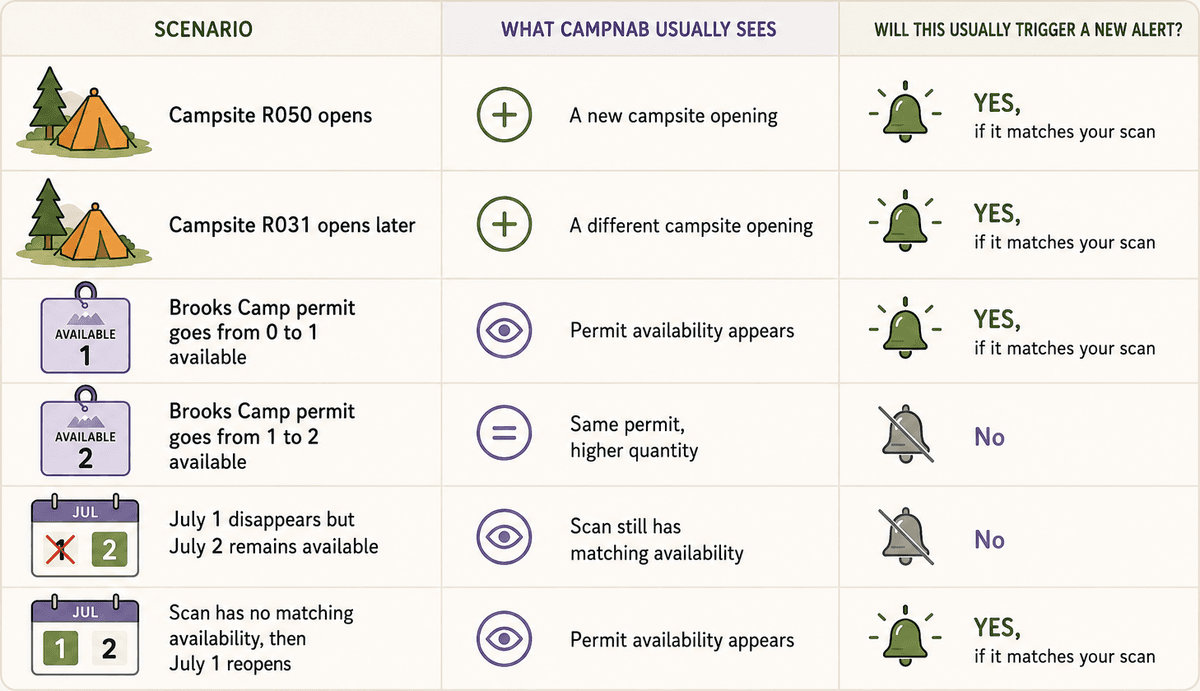
This table is simplified, because every reservation system has its own quirks. Still, it captures the main idea: a new campsite opening and a change in permit quantity are not always the same thing.
Date ranges can add another layer of confusion
Date ranges can add another wrinkle, because your scan might still match some availability even after the specific date you noticed has disappeared.
Let’s say you create a permit scan for July 1 – 5 for 1 or more nights. At 2:52 a.m., Campnab sees availability for July 1 and July 2, so it sends you an alert. A few hours later, July 1 gets booked by someone else, but July 2 is still available. Later still, July 1 opens up again.
At first glance, you might expect another alert for July 1. That would make sense if your scan was only watching July 1. But in this case, the scan was watching July 1 – 5. Since July 2 remained available, the scan never fully returned to a state of “no matching availability.” From Campnab’s perspective, there was still something available that matched your scan.
So when July 1 opened again, Campnab might not send a second alert, because the broader scan was already considered available. You might be thinking in terms of specific dates, while Campnab is evaluating the overall scan: “Is there anything available here that matches what this person asked us to watch?”
Brooks Camp is not the same as every permit
The Brooks Camp example is a little unique because it is essentially the only permit of its type available at Katmai. From Campnab’s perspective, that can make it behave like one reservable item with a changing number of available spaces.
Other parks can work differently. Some parks have many different permits available, and each of those permits might behave more like its own reservable item. So, a new opening for one permit might be different from a new opening for another permit, even if both fall under the broader umbrella of wilderness or backcountry access.
This is one of the reasons we’re careful not to make one universal statement about all permits. Some permit scans behave more like shared inventory. Others behave more like separate bookable items. It depends on how the park and its reservation system structure those opportunities.
Why we don’t alert for every small inventory change
Campnab is designed to notify you when it finds a useful opening, not to send a new message for every small change in a booking calendar.
If someone cancels a seven-night campsite reservation, all seven of those nights might appear at once. If your scan is set up for 1+ nights during that range, we don’t want to send seven separate text messages at the same time. That would be noisy and not especially helpful. In most cases, one alert saying “something matching your scan is available” is what people actually need.
With permits, the same idea can apply to inventory counts. If the same permit goes from one available space to two available spaces, that is useful information in the booking system, but it might not represent a new opening in the same way that a different campsite opening would.
The result is that campsite alerts and permit alerts can feel slightly different, even when both are working as intended.
How to interpret a Campnab alert
A Campnab alert means that we recently found availability matching your scan. It does not mean the opening is being held for you. It also does not guarantee that the same space, site, permit, or date will still be available when you click through.
This matters because popular openings can disappear quickly. Other campers might be watching the same booking system, and some might be checking the official site directly. In high-demand parks, a permit or campsite can be gone within minutes.
So, when you receive an alert for something you want, it’s best to click through as soon as you can.
How to set up your scans
If you’re flexible, a broad scan is usually the right approach. For example, if you’d happily take any two nights between July 10 and July 20, then a wider date range gives Campnab more chances to find something that works. This is often the best strategy for popular parks, because flexibility tends to improve your odds.
On the other hand, if you only want very specific dates, it’s usually better to create separate scans for those dates. So if you only want July 15 for one night, create a scan for July 15. If you also want July 17 for one night, create another scan for July 17.
That way, each date is being watched more directly, and the alert behaviour will generally make more sense. This is especially helpful with permits. A broad permit scan can be useful if you’re flexible, but it can also create confusing results if some dates stay available while others disappear and reappear.
Best setup: If you only care about one permit date, create one scan for that exact date. If you care about two separate dates, create two separate scans. Use broad permit scans when you’re genuinely flexible and would be happy to book more than one possible date.
If you’re testing Campnab for permits like Brooks, use a narrow scan
Some members create a broad scan just to see how Campnab works. That makes sense. You want to know whether alerts will arrive and how quickly the system responds.
The trouble is that broad permit scans can be confusing as tests. If one date remains available while another disappears and reappears, the scan might still have matching availability the whole time. That can make it seem like Campnab missed something, even though the broader scan never returned to a fully unavailable state.
If you’re testing the system, a narrow scan is usually easier to understand. Pick one unavailable date, permit, campground, or campsite that you’re interested in. Then, if that specific thing opens up, the alert behaviour will be much easier to follow.
What higher-tier plans do and don’t change
A higher-tier membership does not mean Campnab sends a new notification for every tiny change in a booking calendar.
Higher-tier plans allow for more scans and/or more frequent scanning, depending on the plan. That can improve your chances of spotting openings quickly. However, alerts are still based on your scan criteria and whether Campnab detects a matching opening.
So, as a general rule: use a broad scan when you’re flexible; use separate scans when exact dates matter; and avoid using a broad scan as a test of how alerts work, especially with permits.
The main takeaway
Campnab is designed to alert you when it finds availability that matches your scan. With campsites, new alerts are often tied to individual campsites opening up. With permits, availability can sometimes behave more like a shared inventory count, which means changes in the number of available spaces may not always trigger a fresh alert.
So, the best setup depends on what you’re trying to do. If you’re open to a range of dates, use a broad scan. If you only care about specific dates, create separate scans for each one. That small difference can make your alerts easier to understand and more closely matched to the trip you’re trying to book.
Further reading
UNABLE TO RESERVE A CAMPSITE?
Get notified when a sold-out campground has availability
Tell us when, where, and how long you want to camp for. We’ll notify you (via SMS) when a suitable spot opens up at that campground—so you can nab that sold-out campsite reservation!


