
Crystal Cove Booking Glitch: An Update on the Available / Add-On Flicker
Posted Thursday, January 8, 2026

Eric Karjaluoto
I’m one of the two people working on Campnab. I like to run, ski, bike, and camp with my family and friends. (I love saunas.)
Find me:


TL;DR: A bug in the Reserve California booking system is causing Crystal Cove dorm dates (outside the 30-day booking window) to intermittently display as either “Available” or “Add-On”. This creates false availability and extra alerts. Best workaround: Temporarily exclude dorms from your scans, or pause scans until you’re within 30 days of arrival.
—
If you’ve seen repeated alerts for the dorms at Crystal Cove, or spotted dates that briefly look bookable only to disappear, you’re not alone. We’ve been monitoring this abnormal alert activity and checking the booking system to gain a better understanding of what’s happening.
This is a temporary system bug
After a fair bit of poking around, I spotted several available dorm rooms. When I advanced to the following week and back, these same rooms switched to “Add-On”. This strange behavior persisted as I moved back and forth in the Reserve California calendar.
I got in touch with the support team at Tyler Technologies, which Reserve California runs on. Their staff were able to reproduce this issue and agreed that this was a bug. In short, dates (particularly for Crystal Cove dorms) were flipping between “Available” and “Add-On”. In some cases, selecting these dates triggers an “Arrival Date Booking Restriction” error.
The issue was reported internally and escalated. It appeared to be fixed in late November, but returned shortly thereafter. So, although a fix is in the works, we don’t know when it’ll be resolved.
Why the dorms are disproportionately affected
Crystal Cove has two different booking rules. Cottages are bookable up to 6 months in advance, while the dorms are bookable only 30 days in advance. The dorms still appear in the long-range availability grid, but anything beyond 30 days should always show as “Add-On.”
What’s going wrong is that those future dorm dates are intermittently rendered as “Available”. These availabilities immediately revert to “Add-On” when paging or refreshing. Because this happens repeatedly, and sometimes within seconds, it creates the appearance of real availability and triggers new alerts.
Why this causes extra Campnab alerts
Our system is doing exactly what it’s designed to do. It’s looking for when campsites/cabins change from unavailable to available. When that happens, it notifies you of this availability.
When the underlying platform rapidly changes state (“Available” to “Add-On” to “Available”), alerts fire—even though the dates aren’t truly bookable yet.
The shortcoming in our system is that it can’t tell if a site that is shown as available is shown inaccurately by the booking system. So, until Reserve California resolves the issue, this flickering is unavoidable at the source.
What you can do right now
Until this availability bug is permanently fixed, there are two effective ways to avoid alert noise.
The first is to pause scans until you’re inside the 30-day window. For dorm bookings, this is the simplest approach. Once you’re inside the valid booking window, the flickering stops.
The second option—and the one we recommend—is to temporarily exclude dorms from your scans. You can do so by opening your scan, selecting all of the cabins at Crystal Cove other than the dorms, and saving your changes. (Once you’re within 30 days of arrival, you can add the dorm rooms back into your scan.)
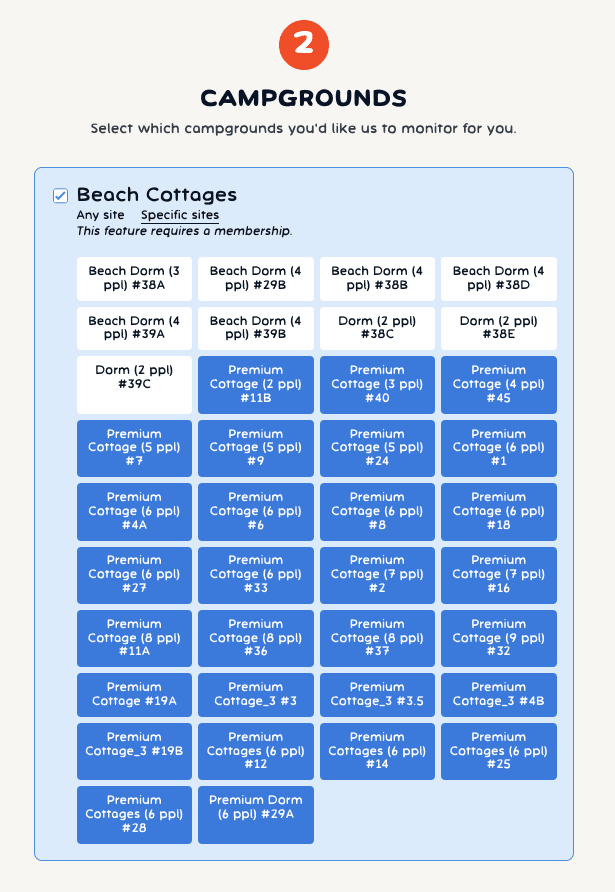
Filtering does require a plan. So, if your scan for Crystal Cove Cottages is pay-per-use, you can change to a plan here. When you do, your purchase will be prorated. If you switch to a plan specifically because of this issue, let me know, and I can refund one of your pay-per-use scans.
Where things stand
We’re hopeful this issue will be resolved soon. Until then, filtering dorms or timing scans around the 30-day window will give you the cleanest experience. If you need help adjusting your scans or want me to take a look, please reach out.
I’ll personally keep an eye on this issue on a daily basis. Once the flickering issue on Reserve California is resolved, I’ll update this article.
—
📷 Photo credit: Matt Artz
Related articles
UNABLE TO RESERVE A CAMPSITE?
Get notified when a sold-out campground has availability
Tell us when, where, and how long you want to camp for. We’ll notify you (via SMS) when a suitable spot opens up at that campground—so you can nab that sold-out campsite reservation!


